> ## Documentation Index
> Fetch the complete documentation index at: https://decageo.ai/docs/llms.txt
> Use this file to discover all available pages before exploring further.
# Category Basics
> The sixteen on-page fundamentals almost every top-ranked brand in a category shares, each with why it matters, how to apply it, and a copy-paste AI prompt. A Pro page under each category chart.
Category Basics is the floor: the on-page fundamentals almost every top-ranked brand in the category already has, sorted so you close the most widespread gaps first. It is a **Pro** page under each category chart.
**Where it is.** Open a chart's [Weekly Breakouts](/docs/using/charts#weekly-breakouts) tab and click **See all 16 basics** under the Category Basics preview. [GEO Guide](/docs/using/geo-guide) prescriptions also link here. Signed out, the link asks you to sign in; on the Free plan it returns you to Weekly Breakouts with an upgrade prompt.
 ## The list
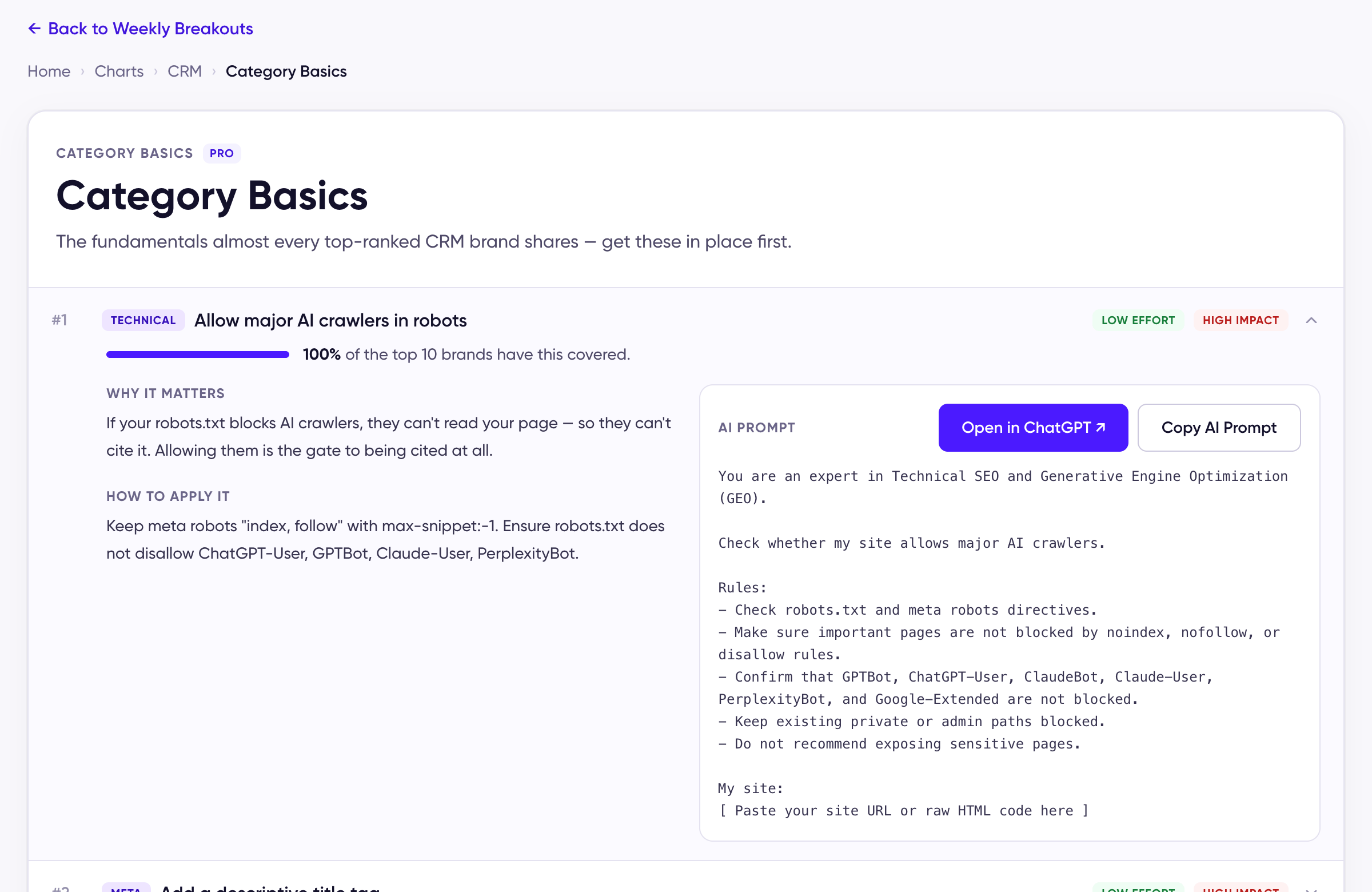
Sixteen items, each tagged **Technical**, **Meta**, or **Content**, and rated by **effort** and **impact**. The bar on each item is its coverage: the share of the category's top 10 brands whose pages have it (*"100% of the top 10 brands have this covered"*). Coverage is recomputed for the week selected, so the order can shift as the top 10 changes.
Expand an item for:
* **Why it matters** — what the basic does for AI citation, in two sentences.
* **How to apply it** — the concrete change on your page.
* **AI Prompt** — a ready-to-run prompt. **Open in ChatGPT** opens it in a new tab with the question filled in; **Copy AI Prompt** copies it to paste wherever you like. Add your page URL or content and AI applies the basic for you: the exact rewrite, tag, or markup it calls for.
## Arriving from the GEO Guide
When a prescription in the GEO Guide sends you here, the item it named opens expanded, so you land on the basic that answers what the Guide found. **Back to Weekly Breakouts** at the top returns you to the chart.
## How to use it
Work top down. The items at the top are the ones nearly every leader has, so a gap there is the most likely reason a page isn't cited. Once the basics are in place, the [Weekly Playbook](/docs/using/weekly-playbook) shows the moves this week's movers made on top of them, and the chart tells you whether the change worked — rankings refresh weekly, and changes usually need a few weekly cycles to show up.
This documentation is built and hosted on [Mintlify](https://mintlify.com), a developer documentation platform.
## The list
Sixteen items, each tagged **Technical**, **Meta**, or **Content**, and rated by **effort** and **impact**. The bar on each item is its coverage: the share of the category's top 10 brands whose pages have it (*"100% of the top 10 brands have this covered"*). Coverage is recomputed for the week selected, so the order can shift as the top 10 changes.
Expand an item for:
* **Why it matters** — what the basic does for AI citation, in two sentences.
* **How to apply it** — the concrete change on your page.
* **AI Prompt** — a ready-to-run prompt. **Open in ChatGPT** opens it in a new tab with the question filled in; **Copy AI Prompt** copies it to paste wherever you like. Add your page URL or content and AI applies the basic for you: the exact rewrite, tag, or markup it calls for.
## Arriving from the GEO Guide
When a prescription in the GEO Guide sends you here, the item it named opens expanded, so you land on the basic that answers what the Guide found. **Back to Weekly Breakouts** at the top returns you to the chart.
## How to use it
Work top down. The items at the top are the ones nearly every leader has, so a gap there is the most likely reason a page isn't cited. Once the basics are in place, the [Weekly Playbook](/docs/using/weekly-playbook) shows the moves this week's movers made on top of them, and the chart tells you whether the change worked — rankings refresh weekly, and changes usually need a few weekly cycles to show up.
This documentation is built and hosted on [Mintlify](https://mintlify.com), a developer documentation platform.