> ## Documentation Index
> Fetch the complete documentation index at: https://decageo.ai/docs/llms.txt
> Use this file to discover all available pages before exploring further.
# Weekly Playbook
> The moves behind this week's breakouts in a category, ranked by impact and effort, each with the movers that made it, the evidence from their pages, and a copy-paste AI prompt. A Pro page under each category chart.
The Weekly Playbook is what this week's movers did: the on-page changes shared by the products that entered the chart or climbed, ranked by impact and effort so you know where to start. It is a **Pro** page under each category chart and rebuilds every week as the movers change.
**Where it is.** Open a chart's [Weekly Breakouts](/docs/using/charts#weekly-breakouts) tab and click **See how** on a play or **See all** under the Weekly Playbook preview. [GEO Guide](/docs/using/geo-guide) prescriptions also link here. Signed out, the link asks you to sign in; on the Free plan it returns you to Weekly Breakouts with an upgrade prompt.
 ## A play
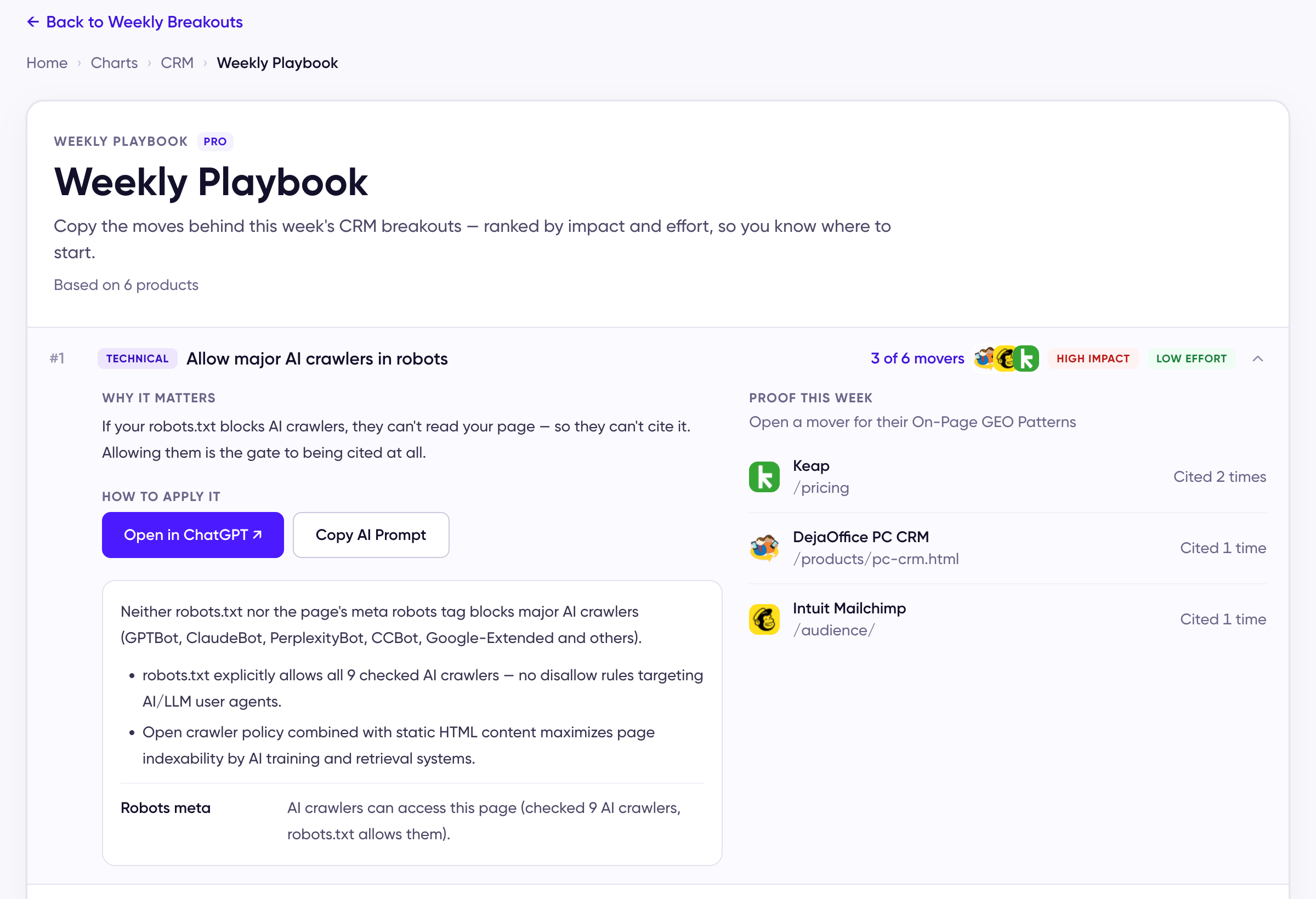
Each play names how many of the week's movers made it, with their logos, and its **impact** and **effort**. Expand one for:
* **Why it matters** and **How to apply it**, with the same **Open in ChatGPT** and **Copy AI Prompt** pair as [Category Basics](/docs/using/category-basics).
* **An evidence box** — what the check found on the movers' pages, in plain words.
* **Proof this week** — the movers' cited pages. Open one for that product's [On-Page GEO Patterns](/docs/using/on-page-geo-patterns).
Plays about where a brand is mentioned off its own site are listed too; they expand but carry no page check, since the evidence is on other people's pages — see [Off-Page Citations](/docs/using/off-page-citations).
## When the list is short
The playbook is built from the week's movers, so a quiet week gives a short list. If no product moved, the page says **No weekly playbook this week**; if products moved without a shared change, **Movement, but no clear play**; both point you to Category Basics. If the week's page analysis isn't available, it asks you to pick another week in Weekly Breakouts.
## Arriving from the GEO Guide
A prescription opens the play it named. Because the playbook rebuilds each week, that play may not be in the current list; when it isn't, the first play opens instead. **Back to Weekly Breakouts** returns you to the chart.
## How to use it
Do the [Category Basics](/docs/using/category-basics) first, then take the plays in order — the top of the list is high impact for low effort. Rankings refresh weekly, so give a change a few cycles before judging it, and watch your own [Chart History](/docs/using/chart-history) rather than a single week.
This documentation is built and hosted on [Mintlify](https://mintlify.com), a developer documentation platform.
## A play
Each play names how many of the week's movers made it, with their logos, and its **impact** and **effort**. Expand one for:
* **Why it matters** and **How to apply it**, with the same **Open in ChatGPT** and **Copy AI Prompt** pair as [Category Basics](/docs/using/category-basics).
* **An evidence box** — what the check found on the movers' pages, in plain words.
* **Proof this week** — the movers' cited pages. Open one for that product's [On-Page GEO Patterns](/docs/using/on-page-geo-patterns).
Plays about where a brand is mentioned off its own site are listed too; they expand but carry no page check, since the evidence is on other people's pages — see [Off-Page Citations](/docs/using/off-page-citations).
## When the list is short
The playbook is built from the week's movers, so a quiet week gives a short list. If no product moved, the page says **No weekly playbook this week**; if products moved without a shared change, **Movement, but no clear play**; both point you to Category Basics. If the week's page analysis isn't available, it asks you to pick another week in Weekly Breakouts.
## Arriving from the GEO Guide
A prescription opens the play it named. Because the playbook rebuilds each week, that play may not be in the current list; when it isn't, the first play opens instead. **Back to Weekly Breakouts** returns you to the chart.
## How to use it
Do the [Category Basics](/docs/using/category-basics) first, then take the plays in order — the top of the list is high impact for low effort. Rankings refresh weekly, so give a change a few cycles before judging it, and watch your own [Chart History](/docs/using/chart-history) rather than a single week.
This documentation is built and hosted on [Mintlify](https://mintlify.com), a developer documentation platform.