

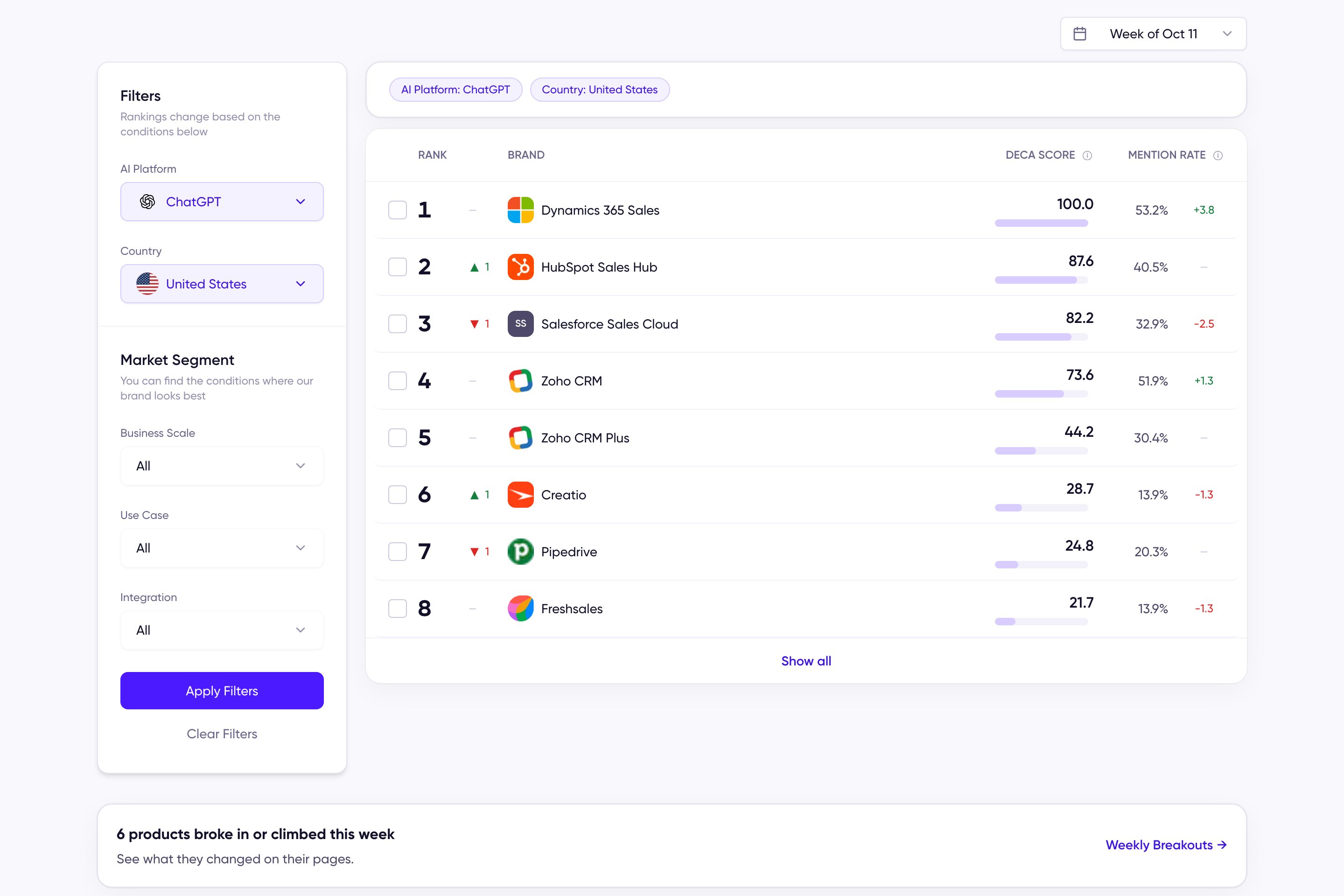
The AI Ranking Chart for the CRM category
The chart header
Above the table, the chart names its week, how many brands are ranked, and the AI platform and market it was measured on, with a link to How we measure. A row of category chips switches to any other chart without going back to the hub. The table shows the top eight; Show all expands it. A band under the table counts how many products broke in or climbed this week and opens the Weekly Breakouts tab. Use the week selector at the top right of the chart to view past weeks.The ranking table
Each row is a product with:- Rank and its movement since last week (▲ up, ▼ down, — unchanged, New for first appearance). Products with the same DECA Score share the same rank.
- DECA Score with a scale bar.
- Mention Rate with its change since last week.
Filters and market segments
Rankings change based on the conditions you set:- AI Platform and Country — the engine and market the rankings are measured on.
- Market Segment — the buyer conditions defined for that category. Segments vary by category: the CRM chart filters by business scale, use case, and integration, while other categories use the conditions that matter in their market. Filtering doesn’t just narrow the list — it re-ranks the category on the queries from that buyer context. See Segment Position.