

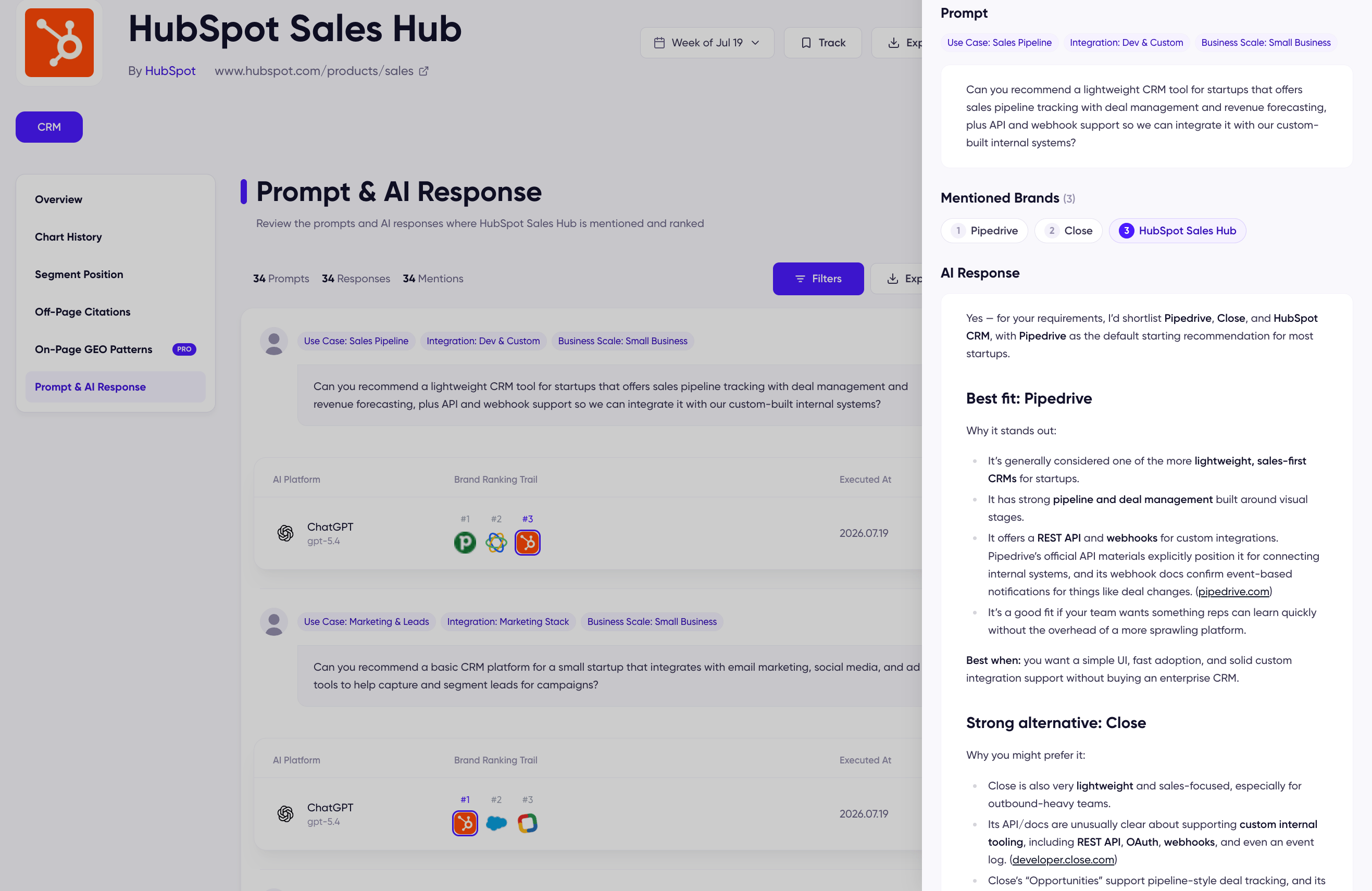
The Prompt & AI Response tab is the raw material behind a product’s ranking: the buyer-style prompts DecaGEO asked that week, and how AI answered each one — which brands it recommended, in what order, in its own words. Every number on the chart traces back to a response you can read here.
Prompt & AI Response tab with prompts and brand ranking trails

Prompt & AI Response for a ranked product

The prompt list

The tab lists every prompt whose response mentioned the product, with the week’s totals — prompts, responses, and mentions — up top. Each entry shows:
  • Persona tags — the buyer conditions the prompt was generated from (for a CRM prompt: use case, integration, and business scale). No two prompts ask as the same buyer; see how the queries are designed.
  • The prompt itself — the full buyer question, verbatim.
  • The result row — the AI platform and model version, the Brand Ranking Trail (every recommended brand in answer order, with this product highlighted at its position), and the execution date.
Use Filters to narrow by AI platform, country, or market segment, and Export CSV [Pro] to take the table with you.

The AI Response panel

Click any result row to open the response panel: the prompt, the Mentioned Brands in their recommendation order, and the AI’s answer. The full response text — what AI actually said about each brand, in its own words — is available on Pro.